Extensibility with Native AOT 2026 November 17
Last updated for version 4.0.3
Beginning with package version 4.0, xUnit.net now supports testing with Native AOT.
There is significant change to the underlying infrastructure of the test framework to support Native AOT, since the primary mechanism of test discovery and extensibility -- runtime reflection -- is severely limited in Native AOT. This document describes the differences between extending xUnit.net in "reflection mode" vs. extending it in "AOT mode".
For a primer on how Native AOT impacts reflection and the resulting analyzers that help you avoid runtime pitfalls, please see the Microsoft documentation on Native AOT, starting with Native AOT deployment. In particular, we strongly recommend that you enable the AOT-compatibility analyzers to help discover potential runtime pitfalls at build time:
<PropertyGroup>
    <PublishAot>true</PublishAot>
    <IsAotCompatible>true</IsAotCompatible>
</PropertyGroup>
Reflection vs. Generation
The biggest change for xUnit.net's core framework is that most of the reflection done by the framework has been replaced by code generation. As of the writing of this documentation, that also means we set a minimum version of .NET 9 and only support C# for Native AOT.
The most obvious place where this impacts the user is discovering tests, so let's compare the build result from reflection vs. Native AOT.
Reflection build result
The reflection version of xUnit.net (how it has worked since v1) will discover your tests at runtime using reflection. The resulting metadata in your test project, therefore, is just the test code itself.
We will run dotnet new xunit3 -f net10.0 and build, which results in this binary:
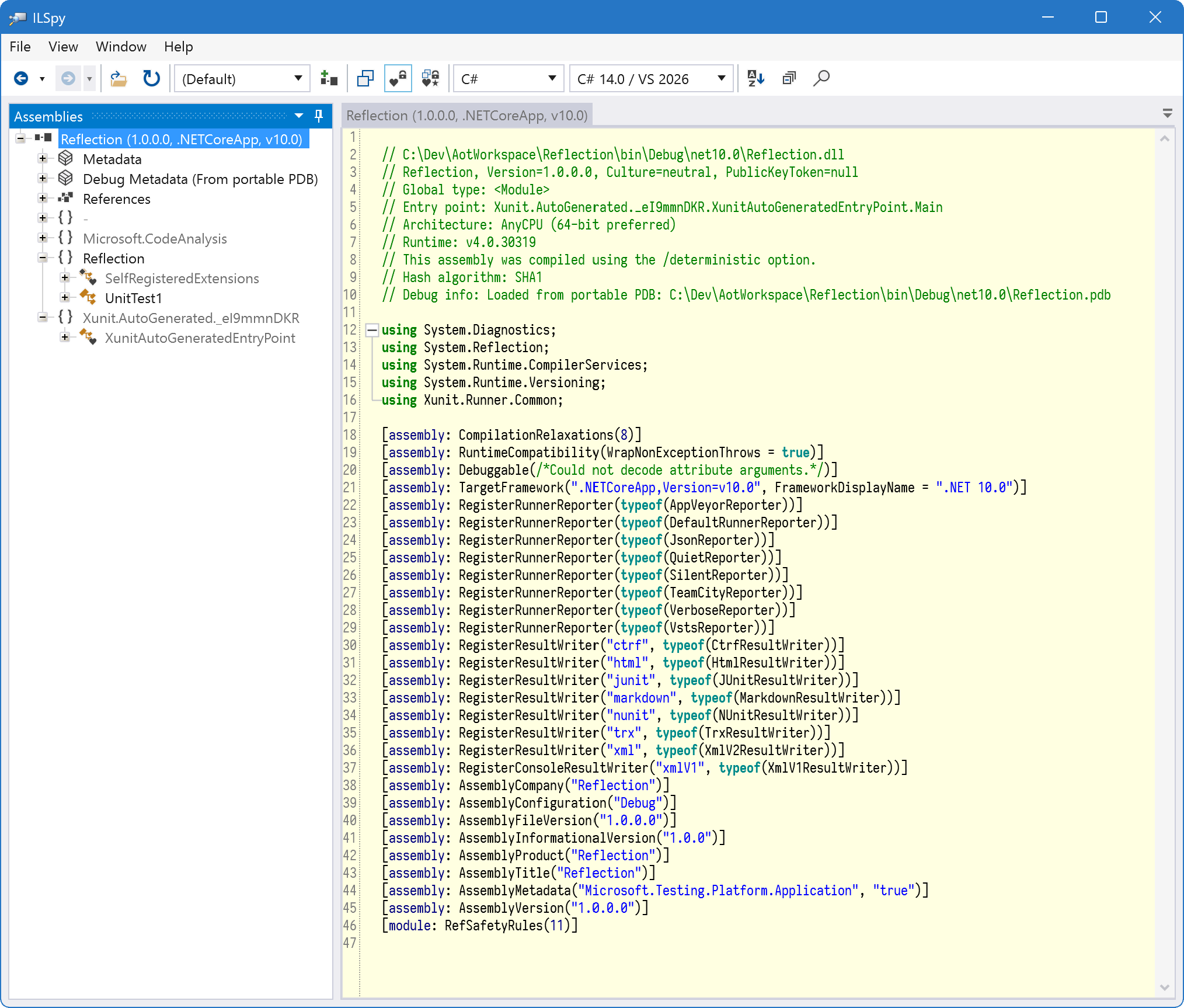
There is a small amount of auto-generated code in here:
Xunit.AutoGenerated._eI9mmnDKR.XunitAutoGeneratedEntryPointis the xUnit.net-generated entrypoint (i.e.,Main) for your unit test applicationReflection.SelfRegisteredExtensionsis the Microsoft Testing Platform-generated list of installed extensions- Less obviously, all the assembly attributes for
RegisterRunnerReporterandRegisterResultWriterare xUnit.net-generated registrations for the built-in runner reporters and result writers (you can disable these with project properties)
Any information about what tests exist is determined at runtime by the test framework.
Native AOT build result
The native AOT version of xUnit.net (new with v3 4.0) will discover your tests at build time using Roslyn Source Generators. The resulting metadata in your test project will now include information about what tests were discovered.
We will run dotnet new xunit3 -f net10.0 --native-aot and build, which results in this binary:
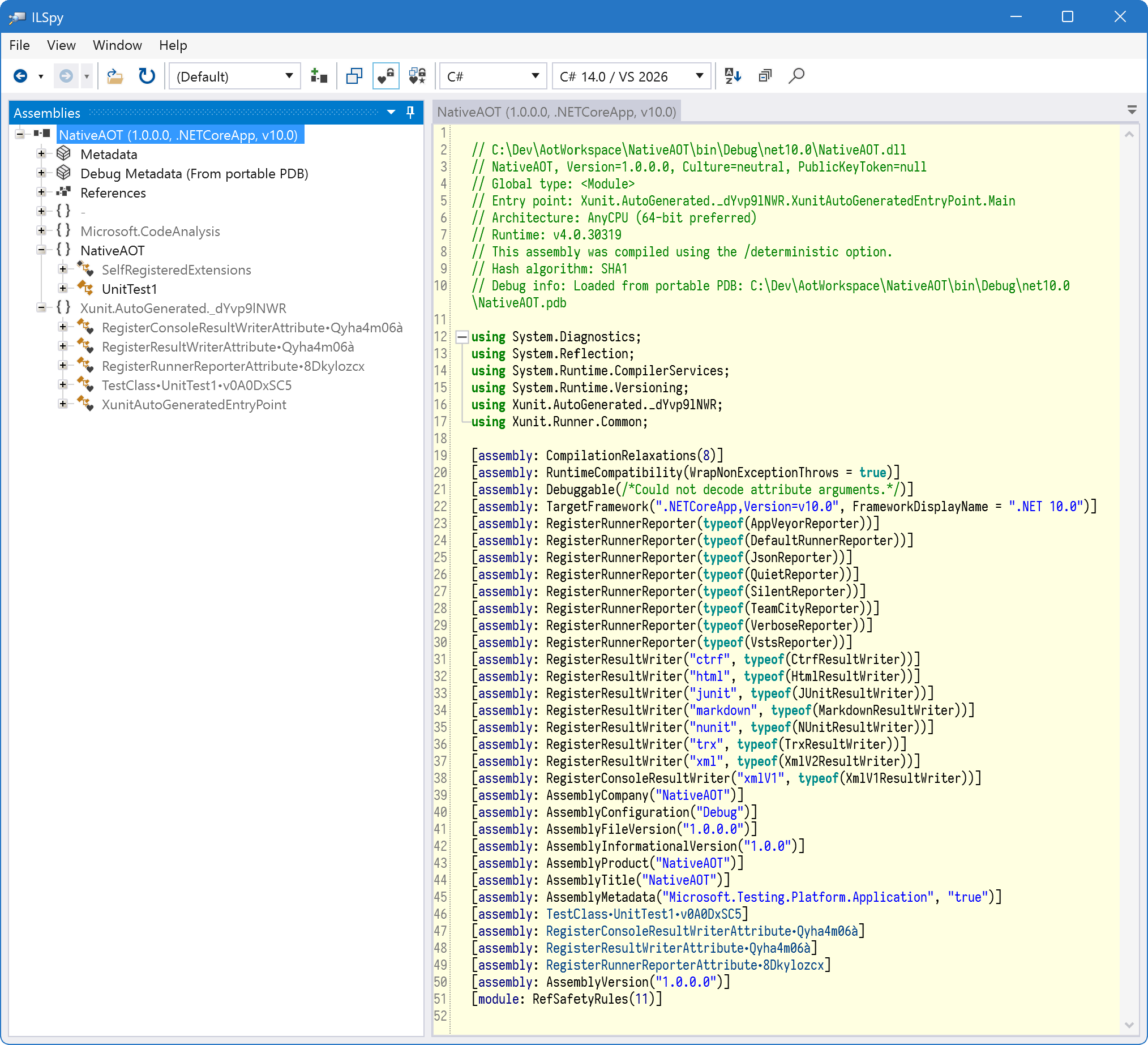
We have several new pieces of generated code:
RegisterConsoleResultWriterAttribute٠Qyha4m06àRegisterResultWriterAttribute٠Qyha4m06àRegisterRunnerReporterAttribute٠8DkylozcxTestClass٠UnitTest1٠v0A0DxSC5
These are all attributes which are applied to the assembly, and the runtime finds and runs these attributes in lieu of the reflection-based inspection that it previously did.
Runner vs. engine config
Taking a look at the implementation of RegisterConsoleResultWriterAttribute٠Qyha4m06à we see this:
using System.Diagnostics.CodeAnalysis;
using System.Threading.Tasks;
using Xunit.Runner.Common;

[ExcludeFromCodeCoverage]
internal sealed class RegisterConsoleResultWriterAttribute٠Qyha4m06à : RunnerInitializationAttribute
{
    public override async ValueTask InitializeAsync()
    {
        RegisteredRunnerConfig.RegisterConsoleResultWriter("xmlV1", new XmlV1ResultWriter());
    }
}
In the reflection version of xUnit.net, the runner would inspect the test assembly for instances of [assembly: RegisterConsoleResultWriter] and in turn register each of the console result writers that it found. In the Native AOT version of xUnit.net, the runner instead runs every assembly-level RunnerInitializationAttribute that is found, and expects that the code contained therein does the registration itself.
In xUnit.net, there is a separation between the "runner" (the code that accepts your requests to find tests and run them) vs. the "engine" (the code which translates the requests from the runner into actual test discovery and execution). This separation means there are two types of registration code—runner registration and engine registration—and thus two types of initialization attributes. In this case, a console result writer is a runner concern ("What result report formats do we support?") so it's a runner registration.
The unit tests themselves are part of the "engine", so their registration code is an engine registration:
using System.Diagnostics.CodeAnalysis;
using System.Threading.Tasks;
using NativeAOT;
using Xunit.v3;

[ExcludeFromCodeCoverage]
internal sealed class TestClass٠UnitTest1٠v0A0DxSC5 : EngineInitializationAttribute
{
    public override async ValueTask InitializeAsync()
    {
        RegisteredEngineConfig.RegisterCodeGenTestClass("global::NativeAOT.UnitTest1", new CodeGenTestClassRegistration
        {
            Class = typeof(UnitTest1),
            ClassFactory = async delegate
            {
                UnitTest1 instance = new UnitTest1();
                return new CoreTestClassCreationResult(instance);
            }
        });
        RegisteredEngineConfig.RegisterCodeGenTestMethod("global::NativeAOT.UnitTest1", "Test1", new CodeGenTestMethodRegistration
        {
            SourceFilePath = "C:\\Dev\\AotWorkspace\\NativeAOT\\UnitTest1.cs",
            SourceLineNumber = 5
        });
        RegisteredEngineConfig.RegisterCodeGenTestCaseFactory("global::NativeAOT.UnitTest1", "Test1", new FactTestCaseFactory
        {
            MethodInvoker = async delegate(object? obj)
            {
                ((UnitTest1)obj).Test1();
            }
        });
    }
}
Here we can see that we are registering several elements of the test code:
RegisteredEngineConfig.RegisterCodeGenTestClassis called once per test class to record information which includes the .NETTypeobject as well as code that knows how to create the test classRegisteredEngineConfig.RegisterCodeGenTestMethodis called once per test method to record information which include source information (where the test method is located in your source code, so that UIs like Test Explorer can allow you click directly into the test method source)RegisteredEngineConfig.RegisterCodeGenTestCaseFactoryis called once per test case to record information which includes code that can run the test method
This is as simple an example as possible. The registration logic can get more complicated as you add things like attribute features (metadata like skipping, display names, etc.), fixtures, theory data, and much more.
It may be worth reviewing RegisteredRunnerConfig and RegisteredEngineConfig to see what registration methods exist (look for the methods that start with Register) to get an idea of the kinds of metadata that xUnit.net attempts to discover at build time.
Generator Utility
xUnit.net has a long history of offering many extensibility points, and this is true for the Native AOT version as well. However, as you can imagine, those extensibility points will now frequently come with a requirement that the developer implement a source generator rather than just adding additional code, since the discovery of much of the information an extension may wish to provide will need to come at build time rather than runtime.
We have provided a new source-based NuGet package named xunit.v3.generatorutility which provides extensible registration logic that can be used by extension developers to make the task of writing source generators simpler.
This includes several base classes that can be used by source generators, including:
XunitGenerator, the base class which implementsIIncrementalGeneratorand provides the core logic to generate the registration attributes. This includes type-safe class name and filename generation. The description of the registration is contained inXunitGeneratorResult.XunitAttributeGeneratorderives fromXunitGeneratorand provides boilerplate logic for generating a registration based on detecting usage of a specific attribute (e.g.,FactAttribute). It includes the ability to validate the attribute as well as provide the transformation from attribute => generator result.XunitAssemblyAttributeGeneratorfurther specializesXunitAttributeGeneratorspecifically for attributes that are decorated at the assembly level. The transformation from attribute =>XunitAssemblyAttributeGeneratorResultis provided automatically, and the implementer provides a processing function that converts the attribute into values on an instance ofCodeGenTestAssemblyRegistration, which maps directly to several of theRegisteredEngineConfigregistration methods (e.g., calling.SetTestCaseOrdereron the registration will translate into a call toRegisteredEngineConfig.RegisterAssemblyTestCaseOrdererFactory).TestMethodGeneratoris a base class which supports registering test cases (and the associated test method and test class). The generator will be notified when it detects the registered attribute (e.g., your custom attribute that's akin toFactAttribute), and then constructs instances ofCodeGenTestMethodRegistration, typically by way of calling the staticCodeGenTestMethodRegistration.FromTestMethodDetailsfactory function.DataAttributeGeneratoris a base type ofXunitAttributeGeneratorthat helps generate data row registrations for data theories. Developers providing custom data sources will implement this. It asks the implementor to transform the data attribute into a result which derives fromDataAttributeGeneratorResult.TraitGeneratoris a base type ofXunitAttributeGeneratorwhich can generate 0 or more traits from a given attribute. It asks the implementer to transform the attribute into 0 or more name/value pairs that represent the trait values, which is then converted into calls toRegisteredEngineConfig.RegisterXyzTrait(whereXyzis the location of the trait: assembly, test collection, test class, or test method.
There are also quite a lot of helper types (like ComparerHelper, HashCodeHelper, Names, Types) as well extension methods for operations like getting matching constructors, determining if a type implements required interfaces, generating type safe names, converting values into C# source equivalents, and more.
Sample Projects
The samples.xunit project include three projects that show three different extensibility points. What they all share in common is a pattern of three projects: one for the extension (this typically includes any custom attributes and code needed at runtime), one for the generator (this consumes the custom attributes and generates source using the generator utility project), and one which is an sample project which ties it all together.
The Sample project often has suggested usage so the developer can verify that the extension is working as intended.
AotCsvDataSource
This example shows how to provide a custom data source. The example uses a .csv file on disk as the source of the data, and converts each row in the CSV into a data row for the test.
The Extension project contains a single attribute:
CsvDataAttribute. Developers apply this to data theories and point it to a file on disk. It also brings a reference to the third party librarySepwhich performs the CSV parsing.The Generator project contains a single generator:
CsvDataSourceGenerator. It derives fromDataAttributeGeneratorand then generates a data source factory which uses Sep to read the rows from the .csv file and turn those into data rows for the test.The Sample project shows an example .csv file and unit test which gets it values from that file.
For comparison, the reflection equivalent of this project is SqlDataExample, which pulls data from a SQL Server rather than CSV file, but is philosophically similar.
AotTraitExtensibility
This example shows how to provide a custom trait source.
The Extension project contains a single attribute:
CategoryAttribute. This attribute accepts a single category value. The intended usage is that this will generate a trait with the nameCategoryand the user provided value. It will also emit a trait with the nameCategorizedand a value oftrue.The Generator project contains a single generator:
CategoryAttributeGenerator. It derives fromTraitGeneratorand generates the trait values from the attribute.The Sample project shows applying
Categoryattribute at the assembly, test collection, test class, and test method level.
For comparison, the reflection equivalent of this project is TraitExtensibilityExample.
AotRetryFact
This example shows how to provide a custom test attribute, in this case one that will retry a failing test a number of times before actually considering them to be failed.
The Extension project contains two attributes:
RetryFactAttributeandRetryTheoryAttribute. It also contains the runtime classes required to properly implement the retry logic (a custom test case, a custom test case runner, custom test case factories used by the generator, and a "delayed" message bus which delays delivering messages until either the test passes or it fails all of its retries.The Generator project contains two generators:
RetryFactGeneratorandRetryTheoryGenerator. They generate registrations that use theRetryFactTestCaseFactoryfrom the Extension project, which ensures that the tests are run properly.The Sample project shows using both
RetryFactandRetryTheory, as well as simpleFactversion that illustrates the temporary failure condition that the retry versions avoid reporting as failure.
For comparison, the reflection equivalent of this project is RetryFactExample.
Built-in Generators
xUnit.net ships with two generator projects: xunit.v3.core.aot.generators (and tests) and xunit.v3.runner.common.aot.generators (and tests). These emit registrations that use RegisteredEngineConfig and RegisteredRunnerConfig, respectively.
The code in the sample projects is intended to be simplified for introduction to using source generation for Native AOT. These projects are used by the framework itself, and therefore are more complex to comprehend; however, they include all existing source generators, so anything that xUnit.net can do will be here in these code projects.
Perhaps the more valuable side of this is the test projects, which show a fairly straightforward strategy of converting example code into registration code which can then be asserted against. There are also a number of "acceptance" style tests in xunit.v3.core.aot.tests which depend on building xunit.v3.acceptance.aot.tests and ensuring that the resulting test project behaves appropriately.